class: center, middle # Plan a Backyard Forest _Plan your own wildlife-friendly food forest_  ##### [The Backyard Forest](https://www.natureworks.org.uk/backyard/) by [Jake Rayson](https://www.natureworks.org.uk/) [natureworks.org.uk/backyard/plan](https://www.natureworks.org.uk/plan/) ###### **Press `P` to see notes and credits**<br>Work licensed under [Creative Commons Attribution-NonCommercial-ShareAlike](http://creativecommons.org/licenses/by-nc-sa/4.0/), embedded work may have other licenses. ??? * Greetings and welcome to The Backyard Forest * My name is Jake Rayson and I’m a forest gardener and forest garden designer. * Online course for everyone who wants to transform their garden into a lush food forest and wildlife haven. * This is the second lecture, and it’s about how to plan your backyard forest. It’s a big one. --- # Course overview <img class="right-img" alt="Chalk circles marking out trees on bark mulch" src="https://res.cloudinary.com/growdigital/image/upload/w_360,h_203/v1589381396/chalk-circles-improved.jpg"> 1. [<span class="u-bg-yellow">Introducing</span>](../intro/) 2. [<span class="u-bg-yellow">Plan</span>](../plan/) 👈 3. [<span class="u-bg-yellow">Design</span>](../design/) 4. [Protect](../protect/) 5. [Perennial Veg](../veg/) 6. [Canopy](../canopy/) 7. [Ground Prep](../prep/) 8. [Shrubs & Ground Cover](../shrubs/) ??? * Number 2 in series of 8 lectures in total * First 3 lectures are about **watching & thinking**, planning and designing. * Middle 3 lectures getting hands dirty starting the _structure_ of the garden: establishing windbreaks, building features, establishing paths and planting the canopy layer, the big trees. * Final 2 lectures are about filling in the structure: clearing the ground, and then planting the shrubs and the ground cover. --- # What you’ll learn  1. Create a map 3. Record observations 4. Measuring techniques 5. Make wishlists <h6 class="breadcrumb">Map — Observations — Measure — Wishlist</h6> --- class: middle, center # 1. Map <h6 class="breadcrumb"><span class="u-underline">Map</span> — Observations — Measure — Wishlist</h6> --- # 1. Create a map  ### “The map is not the territory” <h6 class="breadcrumb"><span class="u-underline">Map</span> — Observations — Measure — Wishlist</h6> ??? Important to remember that a map is a **tool**, not the object of all your work. Only do enough. * [The map is not the territory](https://en.wikipedia.org/wiki/Map–territory_relation), it has a function --- # 1. Create a map  * Mark important features * Try tree positions * Paper, online or CAD <h6 class="breadcrumb"><span class="u-underline">Map</span> — Observations — Measure — Wishlist</h6> ??? * I use CAD **and** paper printouts * Paper, 5mm square A3 * Online eg [Scribble Maps](https://www.scribblemaps.com/) * CAD: [QCAD](https://qcad.org/en/) & [LibreCAD](https://librecad.org/) are free --- ## Paper map  ### Work out your scale! <h6 class="breadcrumb"><span class="u-underline">Map</span> — Observations — Measure — Wishlist</h6> ??? * Most important thing for **all** maps is to work out the scale! * Makes it easy to add trees & bushes, _to scale_ --- ## Paper map  * 1:50 means 1m = 2cm * Average UK garden 16m x 5m * At 1:50 scale, 16m x 5m → 32cm x 10cm <h6 class="breadcrumb"><span class="u-underline">Map</span> — Observations — Measure — Wishlist</h6> ??? * Your scale depends on size of your garden & paper * Rough measurement of garden * 1:100 means 1m = 1cm * Use largest, simplest scale possible * A3 5mm squared pad 29.7cm x 42cm, less than £10 --- ## CAD map 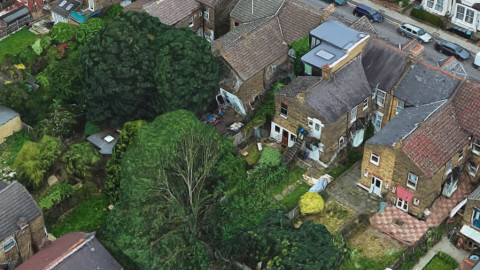 1. Satellite screenshot 2. Metres per pixel 3. Scale in QCAD <h6 class="breadcrumb"><span class="u-underline">Map</span> — Observations — Measure — Wishlist</h6> ??? Screengrab **for personal use only** 1. Screenshot: maximum resolution **with scale**, save as JPEG 2. Calculate metres per pixel 3. Same as your image scale factor 4. Import: create new CAD file, save image in same folder, import image 5. Resize: image automatically scaled at 1 pixel per metre. Select image, open `Property Editor`, enter image scale factor Instructions online: [Forest garden CAD photo](https://www.natureworks.org.uk/blog/forest-garden-cad-photo/) OS maps onscreen from [groundstability.com](https://groundstability.com/public/web/log-order) --- ## CAD map: <span class="u-smaller">1. Satellite screenshot</span> 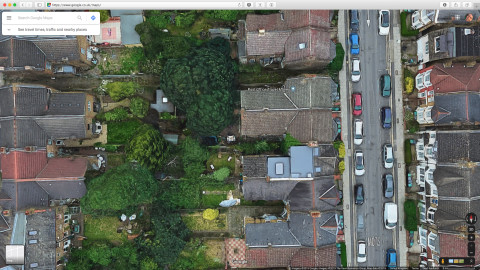 * Highest resolution possible * Be sure to include scale, in metres * Save as good quality JPEG <h6 class="breadcrumb"><span class="u-underline">Map</span> — Observations — Measure — Wishlist</h6> ??? * Resolution varies between vendors * Vendors * [Google Maps](https://www.google.com/maps) * [Bing Maps](https://www.bing.com/maps?) * If you have a mac, [Apple Maps](https://en.wikipedia.org/wiki/Apple_Maps) --- ## CAD map: <span class="u-smaller">2. Metres per pixel</span> 1. Measure pixel length of metres scale 2. **_Metres per pixel_** `5m ÷ 106px = 0.047169811` 4. Image scale factor = metres per pixel 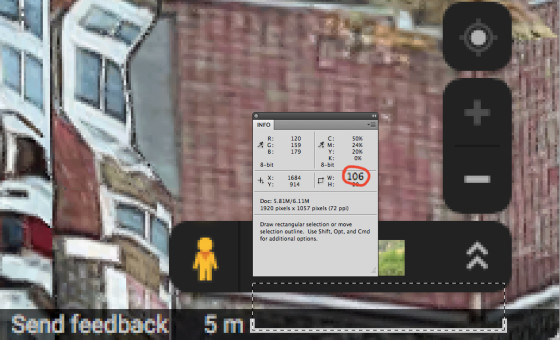 <h6 class="breadcrumb"><span class="u-underline">Map</span> — Observations — Measure — Wishlist</h6> ??? * Use Photoshop, Open Source [GIMP](https://www.gimp.org) or [alternative](https://alternativeto.net/software/gimp/) * [QCAD](https://qcad.org/en/) imports at 1 metre per pixel --- ## CAD map: <span class="u-smaller">3. Scale in QCAD</span> 1. `File → Import` , `Select → Select All` 👈 3. `View → Property Editor` 4. `Width & Height Factor:` _image scale factor_ <span class="our-scale-factor">Our <em>image<br>scale factor</em> is<br>metres per pixel<br><strong>0.047169811</strong></span> 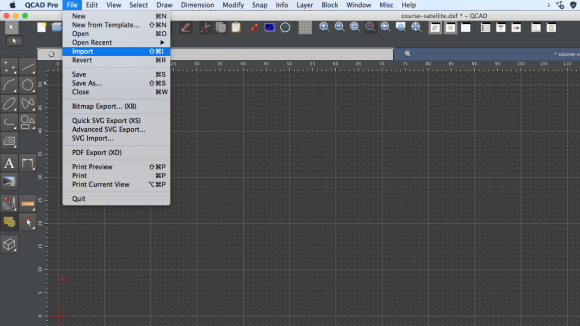 <h6 class="breadcrumb"><span class="u-underline">Map</span> — Observations — Measure — Wishlist</h6> ??? * QCAD document same folder as image * File → Import --- ## CAD map: <span class="u-smaller">3. Scale in QCAD</span> 1. `File → Import` , `Select → Select All` 👈 3. `View → Property Editor` 4. `Width & Height Factor:` _image scale factor_ <span class="our-scale-factor">Our <em>image<br>scale factor</em> is<br>metres per pixel<br><strong>0.047169811</strong></span>  <h6 class="breadcrumb"><span class="u-underline">Map</span> — Observations — Measure — Wishlist</h6> ??? * Select → Select All --- ## CAD map: <span class="u-smaller">3. Scale in QCAD</span> 1. `File → Import` , `Select → Select All` 3. `View → Property Editor` 👈 4. `Width & Height Factor:` _image scale factor_ <span class="our-scale-factor">Our <em>image<br>scale factor</em> is<br>metres per pixel<br><strong>0.047169811</strong></span>  <h6 class="breadcrumb"><span class="u-underline">Map</span> — Observations — Measure — Wishlist</h6> ??? * View → Property Editor --- ## CAD map: <span class="u-smaller">3. Scale in QCAD</span> 1. `File → Import` , `Select → Select All` 3. `View → Property Editor` 👈 4. `Width & Height Factor:` _image scale factor_ <span class="our-scale-factor">Our <em>image<br>scale factor</em> is<br>metres per pixel<br><strong>0.047169811</strong></span>  <h6 class="breadcrumb"><span class="u-underline">Map</span> — Observations — Measure — Wishlist</h6> ??? * View → Property Editor --- ## CAD map: <span class="u-smaller">3. Scale in QCAD</span> 1. `File → Import` , `Select → Select All` 3. `View → Property Editor` 4. `Width & Height Factor:` _image scale factor_ 👈 <span class="our-scale-factor">Our <em>image<br>scale factor</em> is<br>metres per pixel<br><strong>0.047169811</strong></span>  <h6 class="breadcrumb"><span class="u-underline">Map</span> — Observations — Measure — Wishlist</h6> ??? * Width & Height Factor --- ## CAD map: <span class="u-smaller">3. Scale in QCAD</span> 1. `File → Import` , `Select → Select All` 3. `View → Property Editor` 4. `Width & Height Factor:` _image scale factor_ 👈 <span class="our-scale-factor">Our <em>image<br>scale factor</em> is<br>metres per pixel<br><strong>0.047169811</strong></span> 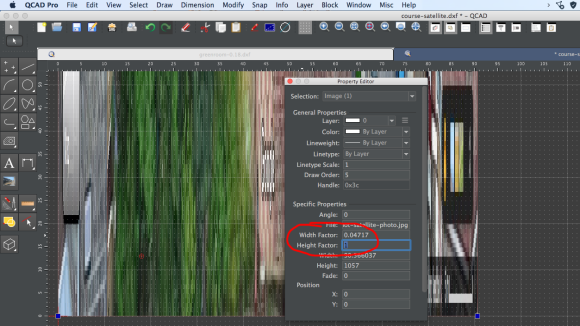 <h6 class="breadcrumb"><span class="u-underline">Map</span> — Observations — Measure — Wishlist</h6> ??? * Width & Height Factor --- ## CAD map: <span class="u-smaller">3. Scale in QCAD</span> 1. `File → Import` , `Select → Select All` 3. `View → Property Editor` 4. `Width & Height Factor:` _image scale factor_ 👈 <span class="our-scale-factor">Our <em>image<br>scale factor</em> is<br>metres per pixel<br><strong>0.047169811</strong></span> 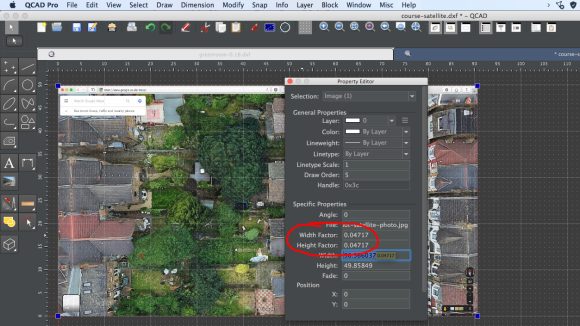 <h6 class="breadcrumb"><span class="u-underline">Map</span> — Observations — Measure — Wishlist</h6> ??? * Width & Height Factor --- class: middle, center # 2. Observations <h6 class="breadcrumb">Map — <span class="u-underline">Observations</span> — Measure — Wishlist</h6> --- ## Checklist  <strong><a href="https://res.cloudinary.com/growdigital/image/upload/v1591883718/forest-garden-planning-checklist.pdf">Download checklist PDF<br> bit.ly/forest-garden-checklist</a></strong> * Observations checklist * Features wishlist * Plants wishlist <h6 class="breadcrumb">Map — <span class="u-underline">Observations</span> — Measure — Wishlist</h6> ??? * Just for you, a PDF print-outable checklist! --- # 2. Observations  1. Position 👈 2. Elements 3. Features 4. Situation <h6 class="breadcrumb">Map — <span class="u-underline">Observations</span> — Measure — Wishlist</h6> ??? 1. Position: the **aspect**, the orientation, elevation, slope 2. Elements: water, wind, sun, earth 3. Features: existing plants, utilities, structures, access 4. Situation: neighbours, privacy, noise, smell * Photograph extensively! Landscape shots. closeups of features. Shots from different angles eg upstairs window * [Cloudinary](https://cloudinary.com), storing images --- ## 2.1 Position  * Orientation 👈 * Elevation * Slope <h6 class="breadcrumb">Map — <span class="u-underline">Observations</span> — Measure — Wishlist</h6> ??? * Orientation, standard compass on iPhone --- ## 2.1 Position  * Orientation * Elevation 👈 * Slope <h6 class="breadcrumb">Map — <span class="u-underline">Observations</span> — Measure — Wishlist</h6> ??? * Elevation, [GPS coordinates](https://www.gps-coordinates.net) website map, screenshot --- ## 2.1 Position 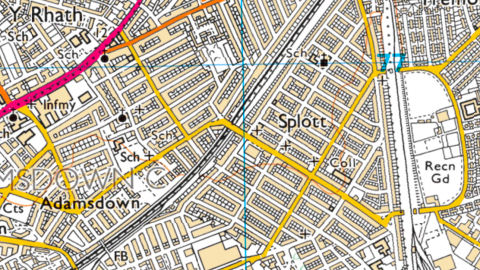 * Orientation * Elevation * Slope 👈 <h6 class="breadcrumb">Map — <span class="u-underline">Observations</span> — Measure — Wishlist</h6> ??? * Ordnance survey map gives you an idea of contour lines * Important for creating swales, which are more important for dry areas * You can survey more accurate contour lines using a [bunyip](https://permaculturenews.org/2016/06/13/bunyip-water-level-measure-contour-lines-swales/) & 2 people --- # 2. Observations  1. Position 2. Elements 👈 3. Features 4. Situation <h6 class="breadcrumb">Map — <span class="u-underline">Observations</span> — Measure — Wishlist</h6> --- ## 2.2 Elements * Water 👈 * Earth * Wind * Sun * Climate <img class="right-img" src="https://res.cloudinary.com/growdigital/image/upload/w_460/v1544352625/ripple-44722376371.jpg" alt="B&W ripple in water"> <h6 class="breadcrumb">Map — <span class="u-underline">Observations</span> — Measure — Wishlist</h6> ??? * Water - drainage and surface water --- ## 2.2 Elements * Water * Earth 👈 * Wind * Sun * Climate <img class="right-img" src="https://res.cloudinary.com/growdigital/image/upload/w_460/v1558802530/soil-93FDE823.jpg" alt="Digging spade in dry soil"> <h6 class="breadcrumb">Map — <span class="u-underline">Observations</span> — Measure — Wishlist</h6> ??? * Geology - local farmers, archeology. And, dig! * Soil type: clay, sand, loam * Soil pH test. ph 7 is neutral, lower is more acid * Soil nutrients: ask local farmers co-op for nutrients NPK test --- ## 2.2 Elements * Water * Earth * Wind 👈 * Sun * Climate <img class="right-img" src="https://res.cloudinary.com/growdigital/image/upload/w_460/v1574167346/meteoblue-windmap.jpg" alt="Wind map from Meteoblue"> <h6 class="breadcrumb">Map — <span class="u-underline">Observations</span> — Measure — Wishlist</h6> ??? * Wind * Wind map from [Meteoblue](https://www.meteoblue.com) * [Met Office Weather Observations](https://wow.metoffice.gov.uk) --- ## 2.2 Elements * Water * Earth * Wind * Sun 👈 * Climate <img class="right-img" src="https://res.cloudinary.com/growdigital/image/upload/w_460/v1542489153/sun-nov.jpg" alt="Screenshot of Sun Surveyor app"> <h6 class="breadcrumb">Map — <span class="u-underline">Observations</span> — Measure — Wishlist</h6> ??? * Our friend, Sun Surveyor again! --- ## 2.2 Elements * Water * Earth * Wind * Sun * Climate 👈 <img class="right-img" src="https://res.cloudinary.com/growdigital/image/upload/w_460/v1573944261/met-office-weather-obs-website.png" alt="Screenshot of Met Office Weather Observation Website"> <h6 class="breadcrumb">Map — <span class="u-underline">Observations</span> — Measure — Wishlist</h6> ??? * Climate - wind, precipitation, temperatures * Over long periods of time * UK climate data available from [Met Office](https://www.metoffice.gov.uk/services/data) --- # 2. Observations  1. Position 2. Elements 3. Features 👈 4. Situation <h6 class="breadcrumb">Map — <span class="u-underline">Observations</span> — Measure — Wishlist</h6> --- ## 2.3 Features 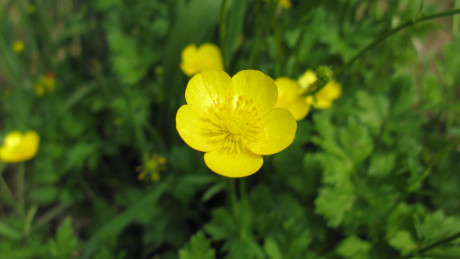 * Wildlife 👈 * Utilities * Structures * Access <h6 class="breadcrumb">Map — <span class="u-underline">Observations</span> — Measure — Wishlist</h6> ??? * Think about existing wildlife habitats & plants * Consider preserving established ecosystems! * Wildlife indicate growing conditions * All existing plants are an effort to remove --- ## 2.3 Features  * Wildlife * Utilities 👈 * Structures * Access <h6 class="breadcrumb">Map — <span class="u-underline">Observations</span> — Measure — Wishlist</h6> ??? * Electricity * Telephone lines * Drains * Water - old photo of drains being dug in forest garden * Gas pipes Photo by Andrew Gustar on [Flickr](https://flickr.com/photos/andrewgustar/27853457545/) --- ## 2.3 Features  * Wildlife * Utilities * Structures 👈 * Access <h6 class="breadcrumb">Map — <span class="u-underline">Observations</span> — Measure — Wishlist</h6> ??? * Photo The Old Shed by fen-tastic on [Flickr](https://www.flickr.com/photos/wiltscat/633245235) --- ## 2.3 Features  * Wildlife * Utilities * Structures * Access 👈 <h6 class="breadcrumb">Map — <span class="u-underline">Observations</span> — Measure — Wishlist</h6> ??? * Vehicles * Pedestrian * Wildlife * Public rights of way Photo by Seika on [Flickr](https://www.flickr.com/photos/nseika/9432980296/) --- # 2. Observations  1. Position 2. Elements 3. Features 4. Situation 👈 <h6 class="breadcrumb">Map — <span class="u-underline">Observations</span> — Measure — Wishlist</h6> --- ## 2.4 Situation  * Privacy 👈 * Noise * Pollution <h6 class="breadcrumb">Map — <span class="u-underline">Observations</span> — Measure — Wishlist</h6> ??? * Privacy - overlooked, enclosed, --- ## 2.4 Situation  * Privacy * Noise 👈 * Pollution <h6 class="breadcrumb">Map — <span class="u-underline">Observations</span> — Measure — Wishlist</h6> ??? * Workshops nearby, neighbours radio, traffic Photo Dad's Radio by Alan Levine on [Flickr](https://flickr.com/photos/cogdog/6138240034/) --- ## 2.4 Situation  * Privacy * Noise * Pollution 👈 <h6 class="breadcrumb">Map — <span class="u-underline">Observations</span> — Measure — Wishlist</h6> ??? * Air pollution from traffic * Run-off from road (water & salt) * Run-off from fields (slurry) * Rubbish from public footpath Photo What An Impressive Slurry Set up.... ££££££££ by Rab Lawrence [on Flickr](https://flickr.com/photos/p300njb/41371957211) --- class: middle, center # 3. Measure <h6 class="breadcrumb">Map — Observations — <span class="u-underline">Measure</span> — Wishlist</h6> ??? Now let’s look at measuring techniques. --- # 3. Measure 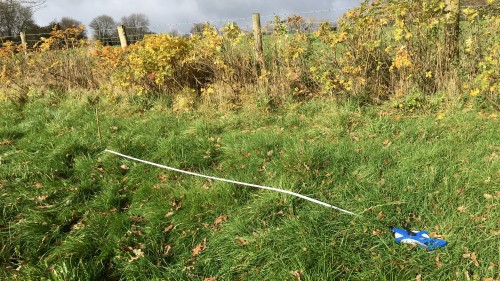 1. Direct line 2. Running dimension 2. Triangulation 3. Offsets <h6 class="breadcrumb">Map — Observations — <span class="u-underline">Measure</span> — Wishlist</h6> ??? * **Always** use physical measurements where you can, don’t rely on satellite photos or Ordnance Survey maps. Measure twice! * Information comes from [Gardenzine.co.uk](https://www.gardenzine.co.uk) * Triangulation: http://www.gardenzine.co.uk/triangulation.html * Offsets: http://www.gardenzine.co.uk/offsets.html * Plot measuring: http://www.gardenzine.co.uk/plot-measuring.html --- # 3. Measure 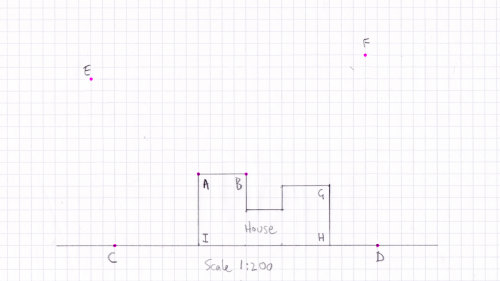 1. Direct line 👈 2. Running dimension 2. Triangulation 3. Offsets <h6 class="breadcrumb">Map — Observations — <span class="u-underline">Measure</span> — Wishlist</h6> --- # 3. Measure 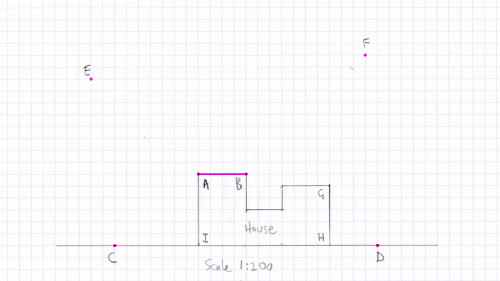 1. Direct line 👈 2. Running dimension 2. Triangulation 3. Offsets <h6 class="breadcrumb">Map — Observations — <span class="u-underline">Measure</span> — Wishlist</h6> --- # 3. Measure  1. Direct line 2. Running dimension 👈 2. Triangulation 3. Offsets <h6 class="breadcrumb">Map — Observations — <span class="u-underline">Measure</span> — Wishlist</h6> ??? * Running dimension good for houses * Measure house, then garden --- # 3. Measure 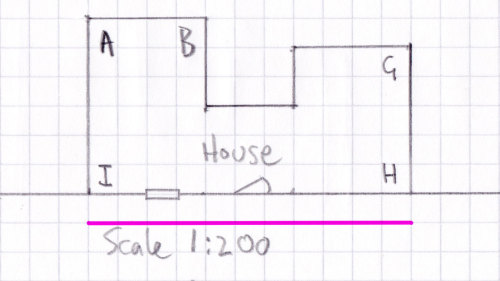 1. Direct line 2. Running dimension 👈 2. Triangulation 3. Offsets <h6 class="breadcrumb">Map — Observations — <span class="u-underline">Measure</span> — Wishlist</h6> --- # 3. Measure  1. Direct line 2. Running dimension 👈 2. Triangulation 3. Offsets <h6 class="breadcrumb">Map — Observations — <span class="u-underline">Measure</span> — Wishlist</h6> --- # 3. Measure  1. Direct line 2. Running dimension 👈 2. Triangulation 3. Offsets <h6 class="breadcrumb">Map — Observations — <span class="u-underline">Measure</span> — Wishlist</h6> --- # 3. Measure  1. Direct line 2. Running dimension 👈 2. Triangulation 3. Offsets <h6 class="breadcrumb">Map — Observations — <span class="u-underline">Measure</span> — Wishlist</h6> --- # 3. Measure 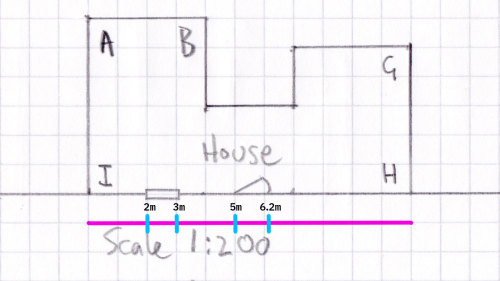 1. Direct line 2. Running dimension 👈 2. Triangulation 3. Offsets <h6 class="breadcrumb">Map — Observations — <span class="u-underline">Measure</span> — Wishlist</h6> --- # 3. Measure  1. Direct line 2. Running dimension 2. Triangulation 👈 3. Offsets <h6 class="breadcrumb">Map — Observations — <span class="u-underline">Measure</span> — Wishlist</h6> ??? * Measure house first * Triangulation. Off fixed point ie house * Alternative is to use [trigonometry to calculate angles](https://www.triangle-calculator.com/?what=sss&a=8.0&b=4.8&c=10.9&submit=Solve) --- # 3. Measure  1. Direct line 2. Running dimension 2. Triangulation 👈 3. Offsets <h6 class="breadcrumb">Map — Observations — <span class="u-underline">Measure</span> — Wishlist</h6> --- # 3. Measure  1. Direct line 2. Running dimension 2. Triangulation 👈 3. Offsets <h6 class="breadcrumb">Map — Observations — <span class="u-underline">Measure</span> — Wishlist</h6> --- # 3. Measure 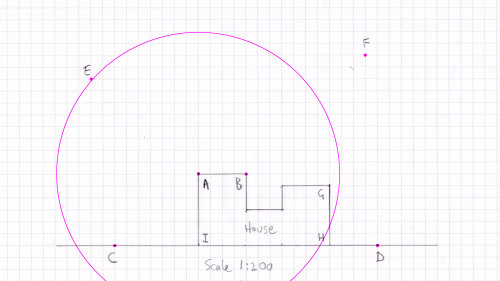 1. Direct line 2. Running dimension 2. Triangulation 👈 3. Offsets <h6 class="breadcrumb">Map — Observations — <span class="u-underline">Measure</span> — Wishlist</h6> --- # 3. Measure  1. Direct line 2. Running dimension 2. Triangulation 👈 3. Offsets <h6 class="breadcrumb">Map — Observations — <span class="u-underline">Measure</span> — Wishlist</h6> --- # 3. Measure  1. Direct line 2. Running dimension 2. Triangulation 👈 3. Offsets <h6 class="breadcrumb">Map — Observations — <span class="u-underline">Measure</span> — Wishlist</h6> --- # 3. Measure 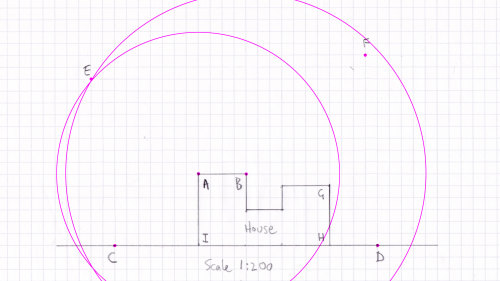 1. Direct line 2. Running dimension 2. Triangulation 👈 3. Offsets <h6 class="breadcrumb">Map — Observations — <span class="u-underline">Measure</span> — Wishlist</h6> --- # 3. Measure 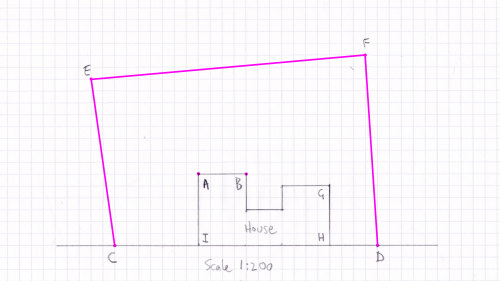 1. Direct line 2. Running dimension 2. Triangulation 👈 3. Offsets <h6 class="breadcrumb">Map — Observations — <span class="u-underline">Measure</span> — Wishlist</h6> --- # 3. Measure  1. Direct line 2. Running dimension 2. Triangulation 3. Offsets 👈 <h6 class="breadcrumb">Map — Observations — <span class="u-underline">Measure</span> — Wishlist</h6> --- # 3. Measure  1. Direct line 2. Running dimension 2. Triangulation 3. Offsets 👈 <h6 class="breadcrumb">Map — Observations — <span class="u-underline">Measure</span> — Wishlist</h6> --- # 3. Measure  1. Direct line 2. Running dimension 2. Triangulation 3. Offsets 👈 <h6 class="breadcrumb">Map — Observations — <span class="u-underline">Measure</span> — Wishlist</h6> --- class: middle, center # 4. Wishlists <h6 class="breadcrumb">Map — Observations — Measure — <span class="u-underline">Wishlist</span></h6> --- # 4. Wishlists 1. Features 2. Plants 3. Pictures  <h6 class="breadcrumb">Map — Observations — Measure — <span class="u-underline">Wishlist</span></h6> --- ## 4.1 Features wishlist  * Wildlife: pond, native, logpile 👈 * Water conservation * Nutrient budget * Seating * Polytunnel/greenhouse <h6 class="breadcrumb">Map — Observations — Measure — <span class="u-underline">Wishlist</span></h6> ??? * Annual veg: grow in well-weeded border, no need for raised bed! * [forestgarden.wales/wildlife-features](https://www.natureworks.org.uk/wildlife-features/) * Think **wildlife habitats** Photo by far closer on [Flickr](https://www.flickr.com/photos/farcloser/4763540195) --- ## 4.1 Features wishlist  * Wildlife: pond, native, logpile * Water conservation 👈 * Nutrient budget * Seating * Polytunnel/greenhouse <h6 class="breadcrumb">Map — Observations — Measure — <span class="u-underline">Wishlist</span></h6> ??? * Rainwater harvesting - guttering, barrels & IBC * Grey water * Reservoir * Swales, slow water down * Bore hole --- ## 4.1 Features wishlist  * Wildlife: pond, native, logpile * Water conservation * Nutrient budget 👈 * Seating * Polytunnel/greenhouse <h6 class="breadcrumb">Map — Observations — Measure — <span class="u-underline">Wishlist</span></h6> --- ## 4.1 Features wishlist  * Wildlife: pond, native, logpile * Water conservation * Nutrient budget * Seating 👈 * Polytunnel/greenhouse <h6 class="breadcrumb">Map — Observations — Measure — <span class="u-underline">Wishlist</span></h6> ??? Photo by Mark AC Photos on [Flickr](https://www.flickr.com/photos/48509939@N07/28988604888/) --- ## 4.1 Features wishlist  * Wildlife: pond, native, logpile * Water conservation * Nutrient budget * Seating * Polytunnel/greenhouse 👈 <h6 class="breadcrumb">Map — Observations — Measure — <span class="u-underline">Wishlist</span></h6> ??? * Consider nursery for medium & larger gardens Photo by Chad Skeers on [Flickr](https://www.flickr.com/photos/chadskeers/5925423237) --- ## 4.2 Plants wishlist 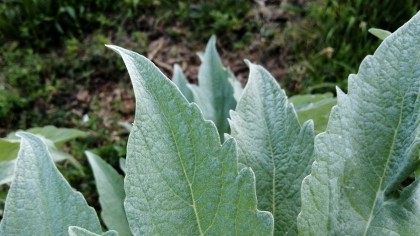 * [Plants For A Future](https://pfaf.org/user/Default.aspx) * [RHS Plant Finder](https://www.rhs.org.uk/Plants/Search-Form) with [native filter](https://www.rhs.org.uk/Plants/Search-Results?form-mode=true&context=l%3Den%26q%3D%2523all%26sl%3DplantForm%26r%3Df%252Fplant_native%252Ftrue) * Think native [wildflowers](https://www.natureworks.org.uk/wildflower/) <h6 class="breadcrumb">Map — Observations — Measure — <span class="u-underline">Wishlist</span></h6> --- ## 4.2 Plants wishlist 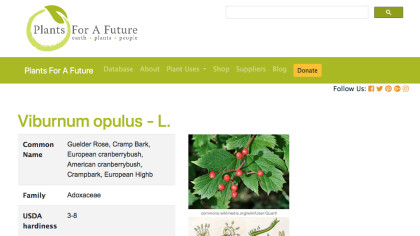 * [Plants For A Future](https://pfaf.org/user/Default.aspx) 👈 * [RHS Plant Finder](https://www.rhs.org.uk/Plants/Search-Form) with [native filter](https://www.rhs.org.uk/Plants/Search-Results?form-mode=true&context=l%3Den%26q%3D%2523all%26sl%3DplantForm%26r%3Df%252Fplant_native%252Ftrue) * Think native [wildflowers](https://www.natureworks.org.uk/wildflower/) <h6 class="breadcrumb">Map — Observations — Measure — <span class="u-underline">Wishlist</span></h6> --- ## 4.2 Plants wishlist 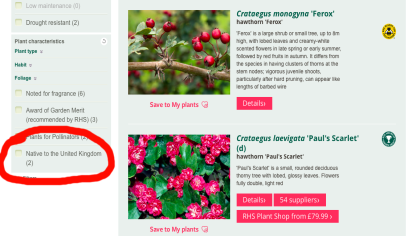 * [Plants For A Future](https://pfaf.org/user/Default.aspx) * [RHS Plant Finder](https://www.rhs.org.uk/Plants/Search-Form) with [native filter](https://www.rhs.org.uk/Plants/Search-Results?form-mode=true&context=l%3Den%26q%3D%2523all%26sl%3DplantForm%26r%3Df%252Fplant_native%252Ftrue) 👈 * Think native [wildflowers](https://www.natureworks.org.uk/wildflower/) <h6 class="breadcrumb">Map — Observations — Measure — <span class="u-underline">Wishlist</span></h6> --- ## 4.2 Plants wishlist 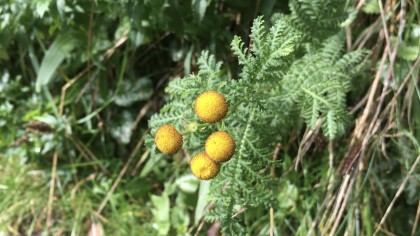 * [Plants For A Future](https://pfaf.org/user/Default.aspx) * [RHS Plant Finder](https://www.rhs.org.uk/Plants/Search-Form) with [native filter](https://www.rhs.org.uk/Plants/Search-Results?form-mode=true&context=l%3Den%26q%3D%2523all%26sl%3DplantForm%26r%3Df%252Fplant_native%252Ftrue) * Think native [wildflowers](https://www.natureworks.org.uk/wildflower/) 👈 <h6 class="breadcrumb">Map — Observations — Measure — <span class="u-underline">Wishlist</span></h6> --- ## 4.3 Pictures  * Look & feel * Features * Plants * Upload to [Pinterest](https://www.pinterest.co.uk/) <h6 class="breadcrumb">Map — Observations — Measure — <span class="u-underline">Wishlist</span></h6> ??? * Inspiration, motivation, aspiration * Collect them all * Stick some on your wall --- # Backyard forest takeaways 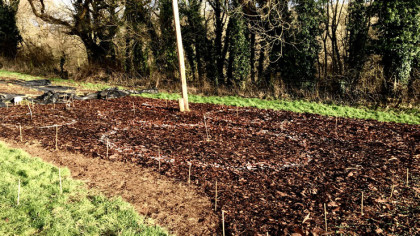 * Observe * Write it down * Take your time **[Download checklist PDF](https://res.cloudinary.com/growdigital/image/upload/v1589400082/forest-garden-planning-checklist.pdf)** <h6 class="breadcrumb">Map — Observations — Measure — Wishlist</h6> --- class: middle, center # The End  <hello@natureworks.org.uk> [natureworks.org.uk/newsletter](https://www.natureworks.org.uk/newsletter) Music: _[Chegsticks](https://iamthemightyjungulator.bandcamp.com/track/chegsticks-3) by [I Am The Mighty Jungulator](https://iamthemightyjungulator.bandcamp.com)_ ??? # Appendix: resources * [Sun Surveyor](https://www.sunsurveyor.com) mobile app * [QCAD](https://qcad.org/en/) Open Source CAD software * [Gardenzine](http://www.gardenzine.co.uk/measureyourgarden.html) info on measuring * [Cloudinary](https://cloudinary.com) for storing images * [Meteoblue](https://www.meteoblue.com) weather data * [MetOffice](https://www.metoffice.gov.uk) weather data